Post Uptown Funk AI Video on TikTok, Reels, and Shorts
 Uptown Funk AI Video
Post an Uptown Funk AI video on TikTok, Reels, and Shorts: download the MP4 with the song included, and if the app mutes it, re-post with the in-app Uptown Funk sound.
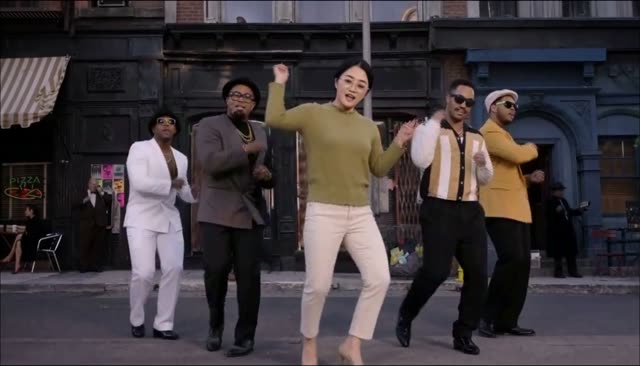
To post Uptown Funk AI video on TikTok, Reels, or Shorts, download the MP4 first. The file already has the song, and the lead is lip-syncing it. The apps may still mute or limit that audio on some posts, because the track is copyrighted. When that happens, post again and attach the Uptown Funk sound from inside the app. This guide is the posting step after the Uptown Funk AI video generator has finished a 15-second 16:9 video.
Post Uptown Funk AI video on TikTok, Reels, and Shorts
You are posting one file: uptown-funk-ai.mp4, saved from the site while you are signed in. It is 15 seconds, widescreen, with no watermark. 768p used 100 credits. 2K HD used 300. You do not export a separate audio stem from this site, and you do not get the song as its own download. The song is inside the video.
Make the video before you open the app. The steps are in how to make an Uptown Funk AI video. If the face looks wrong, use the best photo guide and render again. If the crew order is wrong, re-render using Uptown Funk AI video with friends. You cannot rearrange dancers in the caption.
Download the MP4, song included
On the generator, when the video is ready, use Download. Play the file on your phone once before you upload it anywhere. You should hear the song, and you should see the lead's mouth moving with it. That check matters because a muted post later can look like the site forgot the audio. It did not. The lip-sync guide explains that the mouth was timed to the song in the file.
Keep a copy. Photos you uploaded are set to expire 24 hours after upload, and cleanup can be later than that, but the finished video is a separate download. Save the MP4 to your camera roll or files app so you are not depending on the browser tab.
There is no free video to post. If you still need credits, the pricing page lists three one-time PayPal packs, balance or card, no subscription: $9.99 for 100 credits (one 768p video), $19.99 for 300 credits (three in 768p or one in 2K), and $49.99 for 1000 credits (ten in 768p or three in 2K). Credits last 12 months. A failed render returns its credits. Purchased credits are not refundable.
If the app mutes the song
TikTok, Instagram Reels, and YouTube Shorts each have their own music rules. A file that plays with sound on your phone can still be muted, shortened, or limited when you publish it. That is the platform, not a missing track in the MP4.
If the post is muted, do not try to "turn the volume up" in the editor. Delete that post or leave it, and publish again with the in-app Uptown Funk sound. In each app, the sound picker is where people attach a commercial track the app is allowed to play. Search for the song there and line the start of that sound up with the start of your 15-second clip. The lead's mouth was timed to the original song, so the in-app sound should sit close. It will not be a studio lock if you start the sound a beat late. Trim so the first movement and the first vocal meet.
Do not add a different song and expect the mouth to fit. The lips are not a generic talking animation. A mismatched track makes the lip-sync look broken even when the file was fine.
This site is not affiliated with the artists or their labels, and it does not control whether an app allows the song on a given day or in a given country. If the in-app sound is missing where you live, the video can still be posted silent, or with a sound the app does offer. The mouth will only match the original song.
Captions, and a 16:9 video on a vertical app
A caption can be plain. Say who is in it, if they agreed to be named, and that it is an AI dance. You do not need to explain the trend in the caption. People who want that story can read where the Uptown Funk AI trend comes from. If the joke is a team in suits, the AI CEO dance page is the version of the idea, and you still only post people who agreed. No celebrities, strangers, or children.
A couple of hashtags is enough, such as #UptownFunk or #AIDance. A caption that is only tags does not tell a friend why they were tagged.
The file is 16:9. TikTok, Reels, and Shorts are vertical. You have three honest options, and none of them require cropping the dance into a fake 9:16 portrait:
- Post the widescreen video as it is. The apps add bars above and below, or let the viewer pinch. The full dance stays in frame. This is the option that does not cut off heads.
- Place the 16:9 video in the middle of a vertical canvas and leave a plain background, or a still frame from the same video, in the bars. You do that in the app's editor. Do not stretch the picture taller. Stretching bends faces.
- Crop in on a face for a moment only if you accept losing the crew and the street. Most of the joke is the line of dancers, so a tight crop throws that away. The sample on the generator is landscape for this reason. Do not turn it on its side.
If you add words on top of the picture, keep them off the lead's mouth.
That is the whole posting job: download the file that already has the song, publish it, and if the app mutes the audio, re-post with the in-app Uptown Funk sound. Keep the frame widescreen.