Uptown Funk AI Lip Sync: Song, Mouth, and Limits
 Uptown Funk AI Video
Uptown Funk AI lip sync comes with the original song in the MP4. The lead mouth follows that song while the body follows the dance clip. Faces are not perfect, and the video is 15 seconds.
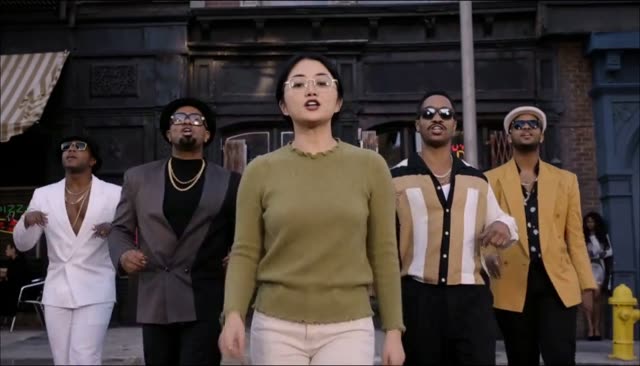
Uptown Funk AI lip sync means the finished video already contains the song, and the lead singer's mouth moves with it. You do not record audio, and you do not drop a music track on afterwards. You upload a photo, the site builds a 15-second 16:9 MP4, and the lead is singing along when you press play. The Uptown Funk AI video generator is the tool. This page explains what that mouth movement is, and what it is not.
Uptown Funk AI lip sync
The song in the file is the original recording, not a hummed cover and not a silent beat you replace yourself. The lead is the person in the first photo. Backup dancers, if you added them, are in the crew spots. Their job in the frame is the dance. The lip-sync you notice is the lead, up front, where the mouth is large enough to read.
You cannot type new words for them to say. You cannot swap in a different song on this site. The video is that one performance, fifteen seconds long, in 768p for 100 credits or 2K HD for 300 credits. There is no watermark. There is also no free video.
How it works, in plain words
The AI follows two guides at once. For the body, it follows the original dance clip, move for move: the walk, the arms, the turns, the way the crew lines up. For the mouth, it follows the song, so the lead's lips open and close with the vocal that is already in the file. Your photo supplies the face, the hair, the glasses, and the clothes. It does not supply a new performance. A still photo has no timing in it. The timing comes from the clip and from the song.
The model that does this dance video is MiniMax H3. You do not pick a model in the form. You pick a photo, optional friends, a quality, and you generate. The street and the camera pattern come from the template, the same one described in where the Uptown Funk AI trend comes from. If you came here from the CEO clip, the AI CEO dance page explains how to make your own team's version with photos of people who agreed.
A clear, front-facing mouth in the lead photo gives the lip-sync more to work with. Sunglasses, a hand over the mouth, or a tiny face make the mouth a guess. The best photo guide is the practical list. Crew photos do not each get their own sung verse. Upload order still places them left to right, which the friends guide covers.
Honest limits
Faces may not match perfectly. Hair, glasses, and the shape of the mouth can drift, especially when the head turns or when the shot is wide. A friend in the back will usually look less like their photo than the lead does. That is normal for this video, not a failed download you should immediately rerun without changing the photo.
Some camera cuts can be simplified. The template has changes of angle. The result keeps the dance, but a quick cut can look smoother or shorter than the reference, and a hand or a shoulder can look odd for a moment. Watching the sample on the generator is the honest preview of that style. It is the same kind of file you will download, including the song.
The video is 15 seconds. It does not extend to a full track, and it does not loop a second verse as a new generation unless you make another video. If you need a longer edit, you do that in another app after you download. This site stops at the 15-second MP4.
Lip-sync will not survive every mute button. The mouth was timed to the song inside the file. If TikTok, Instagram, or YouTube strips or replaces that audio, the mouth can look early or late against a different sound. The fix, when a post is muted, is to re-post with the in-app Uptown Funk sound, lined up with the start of the clip. The posting guide goes through that, including how a 16:9 frame sits in a vertical feed.
What you do, and what you pay
The steps are the same as any other video on the site, written out in how to make an Uptown Funk AI video. Upload on the generator, tick consent, choose 768p or 2K, sign in, and buy a pack if you need credits. Packs are one-time PayPal payments, balance or card, not a subscription. $9.99 is 100 credits, one 768p video. $19.99 is 300 credits, three in 768p or one in 2K. $49.99 is 1000 credits, ten in 768p or three in 2K. The pricing page matches those numbers. Credits last 12 months. Purchased credits are not refundable. A failed or timed-out render returns its credits. Waiting is usually 5 to 8 minutes, sometimes up to 15.
Photos are set to expire 24 hours after upload. Automatic cleanup can be later. They are not sold and not used to train models. Adults only, and only people who agreed. No celebrities, strangers, or children.
If you have used a CapCut template that pastes a face onto a clip, the mouth there is often the original dancer's mouth with your skin on top. This lip-sync is the lead from your photo moving with the song, while the body follows the dance. The tradeoffs are in the CapCut comparison. Expect a recognizable performance, not a frame-accurate impersonation.