Best Photo for Uptown Funk AI Videos
 Uptown Funk AI Video
The best photo for Uptown Funk AI is one person, face large and clear, front-facing, in good light. Glasses and clothes in the photo are what the video uses.
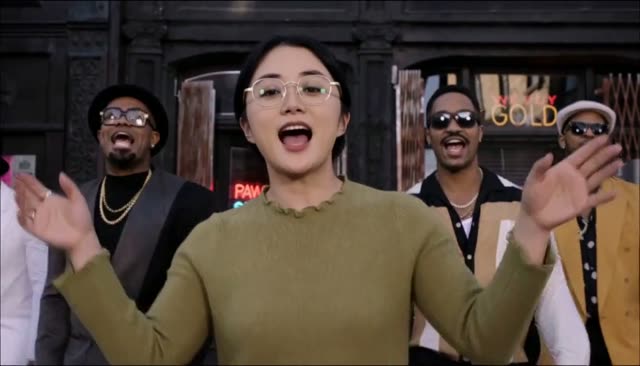
The best photo for Uptown Funk AI is a simple one: one adult, face large and clear, looking at the camera, in ordinary light. That single picture decides the face, the hair, the glasses, and the outfit in a 15-second 16:9 video. The dance moves and the street come from the template. The clothes do not. If the photo is a dark group shot with sunglasses, the video will look like a stranger. This guide is only about the picture you upload on the Uptown Funk AI video generator.
Best photo for Uptown Funk AI
You need one lead photo. Crew photos, if you add them, follow the same rules, one person each. Every file is JPG, PNG, or WebP, up to 10 MB. There is no free video, so it is worth getting the photo right before you spend 100 credits on 768p or 300 credits on 2K HD.
Face large, front-facing, one person
The face should fill a good share of the frame. A selfie at arm's length usually does this. A photo taken across a room, where the head is a small oval, does not. The generator has less detail to lock onto, and the result drifts.
Look toward the camera. A strong profile, a chin-down laugh at the floor, or a face half behind a menu gives the video less to follow. Front-facing does not mean a stiff passport stare. A normal expression is fine. One person only in the lead photo. If two faces are in the frame, the video does not know which one is the singer.
Good light means you can see both eyes and the edge of the hair without a harsh shadow across the nose. A window in front of you is enough. A single overhead bulb in a bar often is not. You do not need a studio. You do need the face to be readable at a glance.
Glasses, clothes, and a half-body crop
Glasses in the photo appear in the video. If you wear them in real life and you want them in the dance, leave them on. If you do not want them, take the photo without them. The template will not add or remove a pair for you.
Clothes work the same way. The outfit comes from the photo, not from the template. A plain t-shirt stays a plain t-shirt. A bright jacket stays a bright jacket. The original AI CEO clip put people in suits because those source photos were people in suits, which the trend guide describes. If you want that suited look for a team video, wear it in the photo, or start from the AI CEO dance page with photos that already look like that. Do not expect the generator to dress you.
A half-body photo is fine. Head and shoulders are the important part. The frame does not have to show your shoes. Avoid cutting the photo through the eyes or through the mouth. Leave a little space above the hair so the head is not jammed against the edge.
What fails
These are the uploads that waste a render:
- A group photo. The lead shot must be one person. Friends get their own photos, up to four, which the friends guide explains. Do not crop four people into one file and hope.
- Sunglasses that hide the eyes. Dark lenses remove the part of the face the video needs most. Clear prescription glasses are fine. Fashion sunglasses are not, for this job.
- A tiny face. The person standing in a wide street photo, or a screenshot of a whole stage, does not give a usable face. Move closer or crop before you upload, and keep the file under 10 MB.
- Heavy filters. Beauty smoothing, face-swap filters, sticker ears, and strong color casts all become part of the "real" face. Use a plain photo from the camera roll.
- A photo of a celebrity, a stranger, or a child. The consent box is adults who agreed, including you. Public figures are not allowed, even if the meme started with famous names.
- A screenshot with captions, emojis, or a phone UI on top of the face. Those marks get treated as part of the picture.
Blur is the quiet failure. If you would not print the photo because the eyes are soft, do not upload it. Motion blur from a dance floor is a common one. Take a still photo first, then let the video do the dancing.
After you pick it
On the generator, the lead box and the optional crew row are separate. Tick consent before you generate. If you are signed in and short on credits, you will be sent to buy a pack before any upload, and the photo you picked can stay in this browser through sign-in and PayPal. Packs start at $9.99 for 100 credits, paid once through PayPal, and the pricing page lists the other two. The steps around the photo are in how to make an Uptown Funk AI video.
The mouth in the finished file follows the song, which is already mixed in. A clear mouth in the photo helps that, but it will not be perfect. Read the lip-sync limits before you expect a broadcast match. Photos are set to expire 24 hours after upload. Automatic cleanup can be later than 24 hours. The site does not sell photos or use them to train models.
If your photo is one clear face in normal light, you are past the part that causes most bad videos. The rest is credits, a few minutes of waiting, and a download.