Uptown Funk AI Video with Friends in the Crew
 Uptown Funk AI Video
Make an Uptown Funk AI video with friends: one lead photo plus up to four crew photos at no extra cost. Upload order is left to right, and empty spots keep the original dancers.
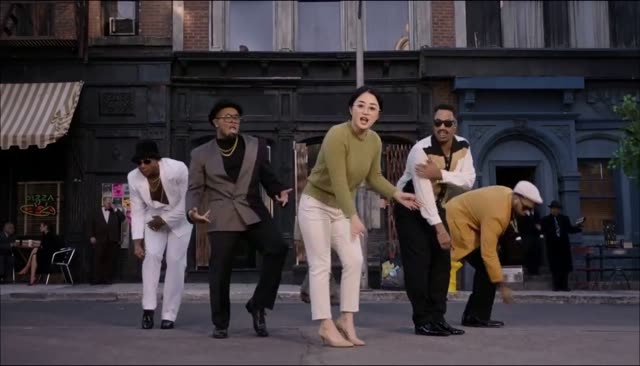
An Uptown Funk AI video with friends puts your group in the street dance: one lead singer in front, and up to four backup dancers behind them. Extra photos do not add to the price. You still get one 15-second 16:9 MP4 with the song and lip-sync, in 768p for 100 credits or 2K HD for 300. The Uptown Funk AI video generator is where those photo slots live. This page is only about who goes in them, and in what order.
The viral clip people are copying showed a line of dancers, which is why a solo selfie can feel thin if you wanted the whole crew. The history of that clip is on where the Uptown Funk AI trend comes from. A team-in-suits version is the subject of the AI CEO dance page. Friends in their own clothes are this guide.
Uptown Funk AI video with friends
You always upload one lead photo. That person is the singer at the front, the one whose mouth follows the song. Then you can add zero to four crew photos. Four is the maximum. A fifth friend needs a second video, with someone else as the lead, not a sixth slot on this one.
Each crew photo is one person. The same rules as the lead apply, and the best photo guide is the checklist: face large and clear, front-facing, decent light, no sunglasses hiding the eyes, no heavy filter. Glasses and clothes in each photo are what that dancer wears. The outfit comes from the photo, not from a shared costume. If your friends want matching jackets, they wear them in the pictures.
Crew faces usually match less closely than the lead. The lead is on camera more, and closer. A backup dancer is smaller in the frame for part of the clip. That is a limit of the shot, not a setting you can toggle. Tell people that before they pay, so nobody expects a portrait-perfect face on every dancer in every cut.
Upload order is left to right
The order you add crew photos is the order of the backup dancers, left to right. The first extra photo is the first backup spot. The second photo is the next, and so on. If you care who stands where, add them in that order. There is no drag-to-reorder step. If you get the order wrong, remove the crew photos and add them again in the right sequence before you generate.
Empty spots keep the original dancers. If you upload a lead and one friend, the other backup places stay the dancers from the template. You do not have to fill all four. A pair, or a trio, is a normal video. You also do not have to invent extra people to "complete" the line.
Everyone must be an adult who agreed
The consent box covers the whole set of photos, not only the lead. Everyone in them is you, or an adult who said yes. No celebrities, no strangers, and no children. A friend who would laugh at the video later is not the same as a friend who agreed beforehand. Ask first. A boss or a coworker is allowed only on that same rule, which the AI CEO dance page repeats because office jokes are where people skip the ask.
Do not upload a group photo into the lead box and call it a crew. Split the people into separate photos, one face each. A collage, a screenshot of a chat, or a photo with captions on the faces will not sort itself into dancers.
Files are JPG, PNG, or WebP, up to 10 MB each. The crew row is on the generator, next to the lead box, and it is labeled as optional and free.
What it costs, and what it does not
Adding friends does not change the credit price. 768p is 100 credits. 2K HD is 300 credits. Packs are one-time PayPal payments, balance or card, with no subscription:
- $9.99 buys 100 credits, one video in 768p.
- $19.99 buys 300 credits, three in 768p or one in 2K.
- $49.99 buys 1000 credits, ten in 768p or three in 2K.
Credits last 12 months. There is no free video. If you are signed in and short of credits, the generator sends you to buy before it uploads, and the photos you already picked can stay in this browser through that trip. The pricing page is the list. Purchased credits are not refundable. A failed or timed-out render returns the credits for that attempt.
The full button order, including the wait of usually 5 to 8 minutes and sometimes up to 15, is in how to make an Uptown Funk AI video. Photos are set to expire 24 hours after upload. Cleanup can be later than that. The site does not sell them or use them to train models.
When you post, the file already contains the song. Apps may still mute it. The TikTok, Reels, and Shorts guide is the workaround: use the in-app Uptown Funk sound if the post is muted. The lead's mouth is covered in the lip-sync guide. Friends in the back are dancing the template's moves. They are not independently choreographed, and some camera cuts can be simplified.
If you only wanted your own face pasted onto a CapCut project, that is a different product. This generator builds a new clip where the people from your photos are the dancers. The CapCut comparison is the honest side-by-side.
Pick the lead, add the friends who said yes, in the left-to-right order you want, leave empty spots empty, and generate once.